


ERP software is a comprehensive integrated management solution that enables businesses to centralize and control all operations—from accounting and human resources to production and sales. With ERP software, organizations can optimize resources, improve productivity, and build transparent, professional workflows.
1. What is ERP? Overview of ERP Software
ERP (Enterprise Resource Planning) is a software solution designed to help businesses manage all operational activities and control resources on a single platform.
ERP software consists of multiple integrated modules that meet the management needs of core business functions such as procurement, manufacturing, sales, finance, and human resources. By automating processes and synchronizing data in real time, ERP helps organizations operate more efficiently, enhance productivity, and make faster, data-driven decisions.
2. Origin and Development History of ERP
The Evolution of ERP from MRP
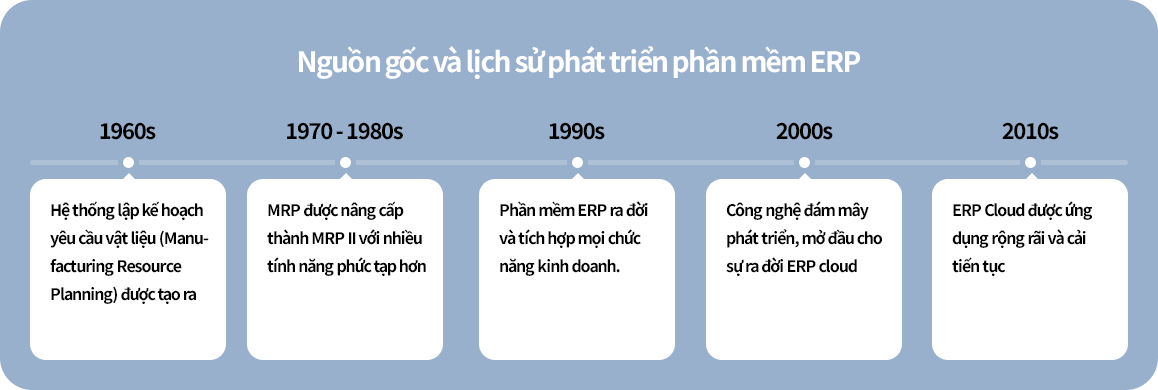
ERP systems originated from MRP (Material Requirements Planning) software in the 1960s. Initially, MRP was designed to help manufacturing companies manage raw materials, plan production, and optimize manufacturing processes.
During the 1970s–1980s, MRP evolved into a more advanced version known as MRP II (Manufacturing Resource Planning). At this stage, the software expanded to include additional functions such as finance, human resources, and supply chain management. This transformation marked the early transition from MRP to ERP, representing a major milestone in how businesses manage operations and resources.
The Development of ERP Systems Over Time
From the 1990s onward, ERP systems were significantly enhanced by integrating all functional modules into a single unified platform. During this period, ERP solutions were typically deployed in an on-premise model, meaning the software operated on physical servers within the organization, resulting in relatively high investment costs.
In the 21st century, the rise of cloud computing brought ERP to a new level. Cloud-based ERP solutions emerged, enabling small and medium-sized enterprises (SMEs) to adopt modern management systems. With advantages such as lower costs, no need for on-site servers, and accessibility from any device with an internet connection, cloud ERP has become increasingly popular.
Today, the enterprise management software market continues to grow rapidly, with both domestic and international ERP solution providers participating. This creates significant opportunities for businesses of all sizes to find ERP systems that match their needs, scale, and budget.
3. Core “Backbone” Modules of ERP Software
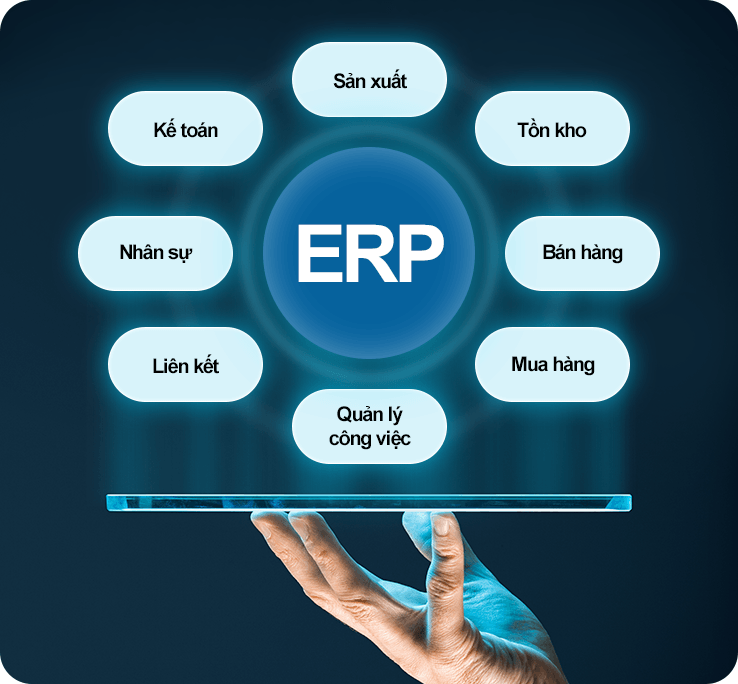
ERP software is composed of multiple essential modules that work together to integrate and streamline all business operations. Below are the core ERP modules:
3.1. Financial Management & Accounting
This module includes features such as accounts payable/receivable management, asset management, general ledger, and financial reporting. Modern ERP systems also support profit management, budgeting, and cash flow control.
3.2. Sales Management
The sales management module helps businesses manage the entire sales process, from quotations and order creation to shipment tracking. In addition, ERP software synchronizes sales data with inventory, accounting, and customer relationship management (CRM).
3.3. Purchasing Management
The purchasing module integrates useful features for managing the procurement process, including request submission, purchase planning, approval workflows, and supplier management. This enables businesses to control purchasing costs effectively and manage inventory efficiently.
3.4. Manufacturing Management
This module supports efficient production planning and control, including bill of materials (BOM) creation, material requirements planning (MRP), and production progress tracking. Some systems also provide cost calculation, profit analysis, and subcontracting management.
3.5. Inventory Management
The inventory module plays a critical role in ERP systems by managing stock movements across sales, purchasing, and production. It helps businesses monitor stock levels by item, track inventory changes, and manage products by serial numbers.
3.6. Human Resource Management & Payroll
The HR module includes functions such as employee records management, attendance tracking, leave management, and payroll calculation. It also allows payroll data to be integrated into the accounting system.
3.7. Task and Work Management
Many comprehensive ERP solutions include internal task and workflow management features for teams and departments. For example, groupware modules may include company-wide announcements, work schedules, and departmental activity logs. This helps businesses manage internal operations more efficiently without the need for additional software.
In addition to these core modules, modern ERP systems can flexibly integrate with supporting devices such as mobile applications, barcode scanners, and time attendance machines, enhancing management efficiency and optimizing the user experience.
4. What Benefits Does ERP Software Bring to Businesses?
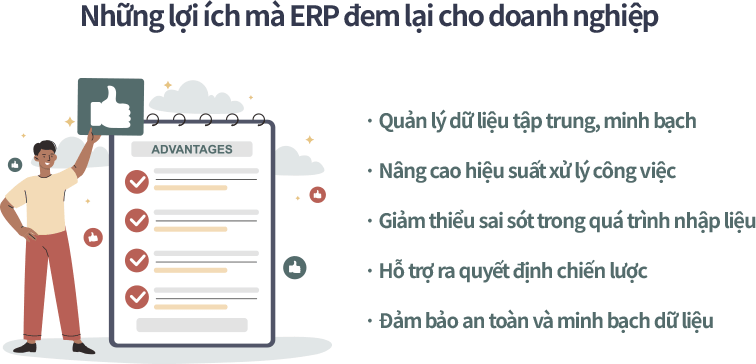
Implementing ERP in enterprise management delivers numerous benefits—not only optimizing operations but also ensuring data security and integrity. Below are five key advantages businesses gain from using ERP software:
4.1. Centralized and Transparent Data Management
When preparing financial reports, businesses often need to consolidate data from multiple departments such as accounting, sales, logistics, and production. Dispersed and fragmented data storage can be time-consuming and may lead to inconsistencies, making financial control more difficult.
ERP (Enterprise Resource Planning) provides a solution by centralizing all data and operational processes into a single system. Thanks to seamless data integration across departments, all transactions related to purchasing, sales, inventory, and more are synchronized in real time. Any data updates are automatically reflected across the system, ensuring consistency and high accuracy.
4.2. Improved Work Efficiency
As businesses grow, their workflows become more complex. Manual approval processes and the physical transfer of documents between departments can slow down operations and reduce efficiency.
ERP systems allow businesses to standardize and automate workflows, especially approval processes. Employees can submit and receive requests online, and electronic documents are routed to the appropriate personnel within seconds. This significantly shortens processing time between departments and enhances overall productivity. For example, the warehouse team can quickly send stock requests to production or accounting via ERP instead of relying on traditional paperwork.
4.3. Reduced Data Entry Errors
A common issue in many organizations is data errors caused by manual entry of customer information and transaction records. These mistakes can affect reporting accuracy and harm the company’s professional image if incorrect documents are shared with partners or clients.
ERP systems address this problem through features like single data entry and data inheritance. Information only needs to be entered once but can be reused across multiple departments, minimizing errors and saving time. Additionally, standardized workflows make it easier to verify and reconcile data, improving management efficiency and workforce productivity.
4.4. Support for Strategic Decision-Making
In an increasingly competitive market, every decision made by leadership plays a crucial role in sustainable business growth. However, accurate and timely decisions require comprehensive data and in-depth analysis.
ERP software serves as a powerful tool by providing comprehensive management reports covering production, sales, inventory, and finance. All data is updated in real time as transactions occur, eliminating the need to wait for manual data compilation and enabling faster, data-driven decision-making.
4.5. Enhanced Data Security and Transparency
Data management is a critical factor in modern business operations. Many organizations still face risks due to inadequate security measures, leading to potential data breaches or loss of sensitive information, which can damage reputation and competitive advantage.
ERP software is designed with multi-layer security systems, allowing access control based on roles and responsibilities with clearly defined permissions. It also supports features such as IP-based login monitoring, data encryption, and access logs for auditing and supervision. As a result, all business data—from finance and HR to customer information—is securely protected, giving organizations confidence in storing, accessing, and sharing information.
5. Which Businesses Should Implement ERP Software?
ERP software helps businesses synchronize information, optimize operational processes, and improve overall system performance. Today, ERP can be flexibly applied across various industries and business sizes.
5.1. Manufacturing Companies
Manufacturers use ERP to plan production accurately, manage raw materials in real time, and track production progress at each stage—improving productivity and ensuring on-time order fulfillment.
Examples: Electronics component manufacturers, packaging, plastics, paper, and mechanical engineering companies.
5.2. Trading and Distribution Businesses
For companies dealing in goods, ERP systems help control inventory, track orders, and manage purchasing and sales processes in a professional and efficient manner.
Examples: Importers and distributors of consumer goods, machinery, and equipment.
5.3. Retail and E-commerce Businesses
ERP solutions enable retailers to integrate both online and offline store management while synchronizing inventory data. With seamless multi-channel connectivity, businesses can enhance customer experience and boost sales.
Examples: Supermarket chains, fashion retailers, and businesses selling عبر e-commerce platforms.
5.4. Service-Based Companies
Service providers can use ERP to manage projects, contracts, tasks, cost allocation, and customer relationships (CRM).
Examples: Financial firms, accounting services, marketing agencies, law firms, and transportation service providers.
5.5. Logistics and Transportation Companies
ERP systems help logistics businesses track shipment routes, manage vehicle fleets, coordinate goods, and optimize logistics costs—while ensuring transparency and accuracy at every stage of delivery.
Examples: Freight forwarding companies, warehousing providers, and domestic/international logistics firms.
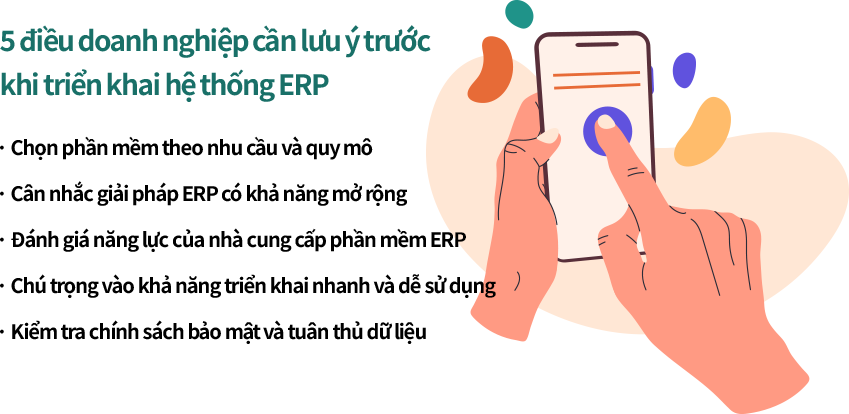
6. Five Key Considerations Before Implementing an ERP System
Implementing ERP software is a long-term strategy that helps businesses automate operations, optimize workflows, and enhance management efficiency across all departments. Before deployment, organizations should carefully consider the following factors:
6.1. Choose Software Based on Business Needs and Scale
Not all ERP solutions fit every business. Before selecting one, ask: “What management challenges are we facing?” and “What are our improvement goals—faster order processing, better inventory control, or more accurate financial analysis?” Clearly defining requirements helps avoid overly complex or unnecessary features.
6.2. Consider Scalability
Instead of choosing a system that only meets current needs, businesses should opt for ERP solutions that can scale or integrate additional modules as they grow, from a single store to multiple branches. A flexible ERP system ensures long-term value and avoids costly system replacements in the future.
6.3. Evaluate the ERP Vendor’s Capability
Don’t just focus on the software—consider the team behind it. A reliable ERP provider should offer strong technical expertise, training services, regular updates, and responsive support. Reviewing past projects, customer feedback, and support capabilities is essential.
6.4. Prioritize Ease of Use and Fast Implementation
A good ERP system should not only be powerful but also user-friendly. If users find it difficult to operate, even the most advanced system can go to waste. Choose solutions with intuitive interfaces, clear documentation, and straightforward implementation processes—especially important for SMEs.
6.5. Ensure Data Security and Compliance
Data is one of the most valuable assets of any business. Prioritize ERP systems with strong security standards (such as SSL, ISO 27001), role-based access control, automatic data backup, and disaster recovery capabilities. For cloud-based ERP, security should be a top consideration from the very beginning.
ERP Solution Best Suited for Small and Medium-Sized Enterprises (SMEs)
With over 25 years of experience as a web-based ERP software provider, ECOUNT ERP has delivered practical benefits to more than 80,000 businesses worldwide, particularly small and medium-sized enterprises (SMEs).
This is a comprehensive ERP management solution specifically designed to meet the needs of all departments, including accounting, sales, manufacturing, inventory, and human resources. ECOUNT’s all-in-one business management system enables companies to maintain tight financial control, plan production effectively, and seamlessly connect all business operations.
Why is ECOUNT ERP a Smart Choice for SMEs?
- Easy to customize and implement based on industry-specific requirements without the need for a specialized IT team
- Transparent and fixed pricing: only 1,000,000 VND/month for full features – a cost-effective yet powerful solution
- Integrated internal “social network” system to enhance communication and collaboration within the organization
- Scalable management capabilities to support business expansion without limitations on features or users
- Dedicated technical support team accompanying businesses throughout implementation and operation
7. Conclusion
Today, digital technology and AI are reshaping the competitive landscape. Implementing an ERP solution is no longer optional—it is a necessary step in business transformation. ERP is not just a tool, but a strategic platform that empowers businesses to control data accurately, make faster decisions, and adapt flexibly in a rapidly changing environment.